TFolio

你手边的PDF 工作伴侣 Your PDF workcompanion,always at hand

轻巧、快速、占内存少。“查看编辑”与“页面组织”两个工作区各管一摊:读、标、改一份 PDF,或把多个文件拼成一个新 PDF。 Light, fast and easy on memory. Two workspaces, each with one job: read, mark up and edit a PDF in View and edit, or combine many files into a new PDF in Organize pages.

版本 0.1.25,MIT 开源,免费使用。支持 Windows、macOS 与 Linux。 Version 0.1.25. Free and open source under MIT, for Windows, macOS and Linux.

轻巧、快速、省内存Light, fast, lean

TFolio 只做 PDF 这件事,所以装得下、开得快,也不和别的程序抢内存。 TFolio does one thing, PDFs, so it installs small, opens fast and leaves memory for everything else.

轻巧Small
Windows 安装包约 6 MB,.dmg、.deb、.rpm 也都不到 10 MB。界面交给系统自带的 WebView,不再捆绑一整个浏览器。 The Windows installer is about 6 MB; the .dmg, .deb and .rpm packages all stay under 10 MB. The interface uses the WebView your system already has instead of bundling a browser.
快速Fast
页面由 Rust 调用 PDFium 在本机渲染,打开即看,滚动、缩放都跟手。 Pages are rendered on your machine by Rust and PDFium, so documents open straight away and scrolling and zooming keep up with you.
省内存Lean
只渲染屏幕上的页面,并提前备好下一页;页面组织读入的文件放在有容量上限的缓存里,文件再多也不会无限占用内存。 Only the pages on screen are rendered, with the next one ready ahead of time. Files added to Organize pages live in a cache with a size limit, so many files never mean unbounded memory.
好上手Friendly
功能按工作区分开,工具栏一眼看全,每一步都能撤销。界面支持8 种语言,明亮、暗黑主题随你选。 Tools are split by workspace and fit on one toolbar, and every step can be undone. The interface speaks 8 languages, in light or dark.
留在本机Local
文档只在你的电脑上处理,不上传到任何服务器。 Documents are processed on your computer and never uploaded anywhere.

两个工作区,各司其职Two workspaces, one job each

左上角一键切换。处理一份文档时用“查看编辑”,要把几份材料合成一份时用“页面组织”。 Switch from the top-left corner: View and edit for working on one document, Organize pages for combining several into one.

把一份 PDF 读透、改好Read and refine one PDF

多个文档各占一个标签页,标签页还能拖到新窗口里并排看。Each document gets a tab, and a tab can be dragged into a window of its own.

  • 单页视图与书籍视图,缩略图、书签随时跳转Single page and book views, with thumbnails and bookmarks to jump around
  • 文字高亮、文字注释,绘制半透明、马赛克或高斯模糊方框Highlights, text notes, and boxes that are translucent, mosaic or blurred
  • 插入空白页,旋转、删除、剪切、复制、粘贴页面Insert blank pages; rotate, delete, cut, copy and paste pages
  • 添加水印与页码,每一步都可撤销、重做Add watermarks and page numbers, with undo and redo for every step
  • 导出图片、拆分 PDF、减小文件大小、打印Export images, split the PDF, reduce file size, print
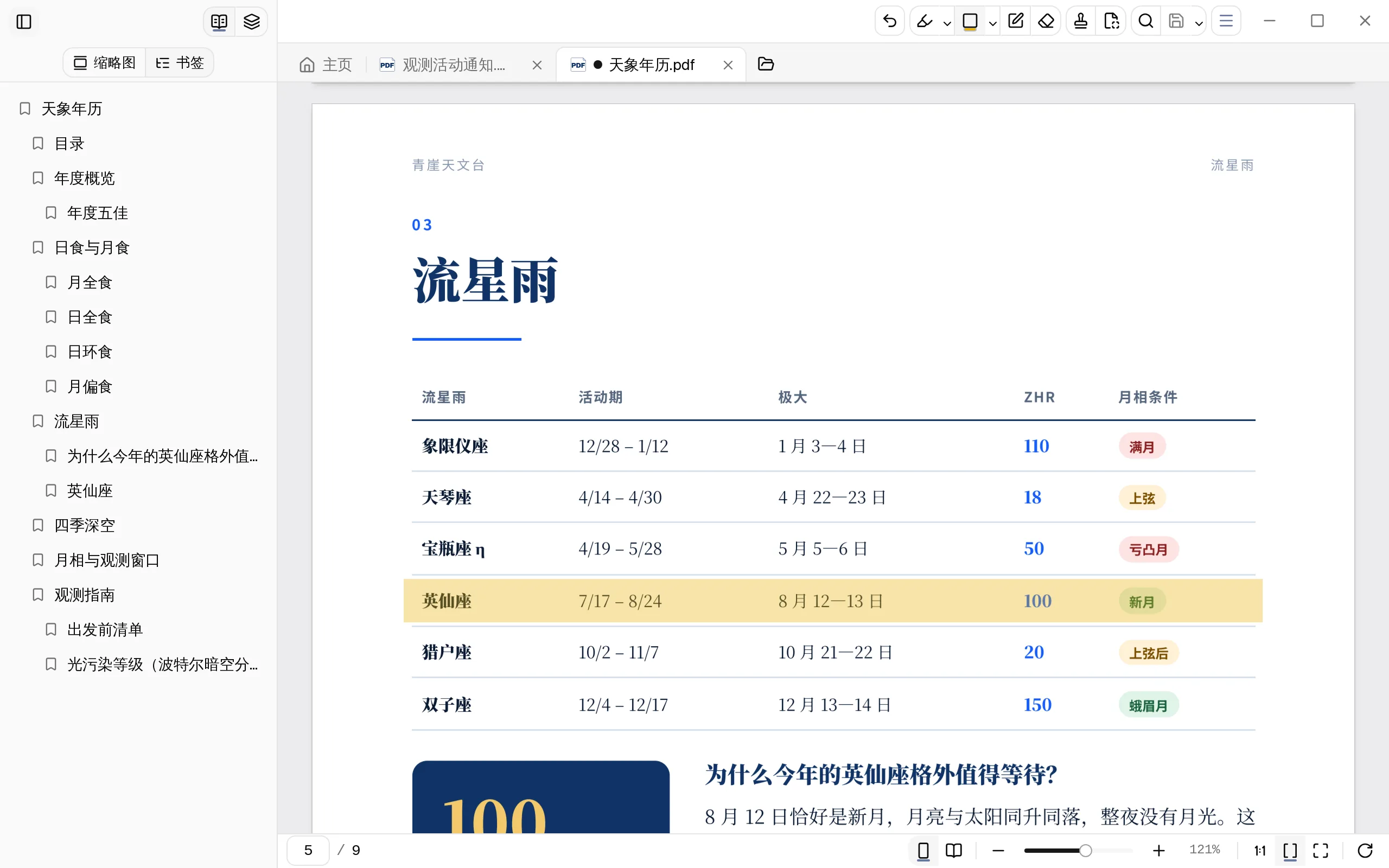
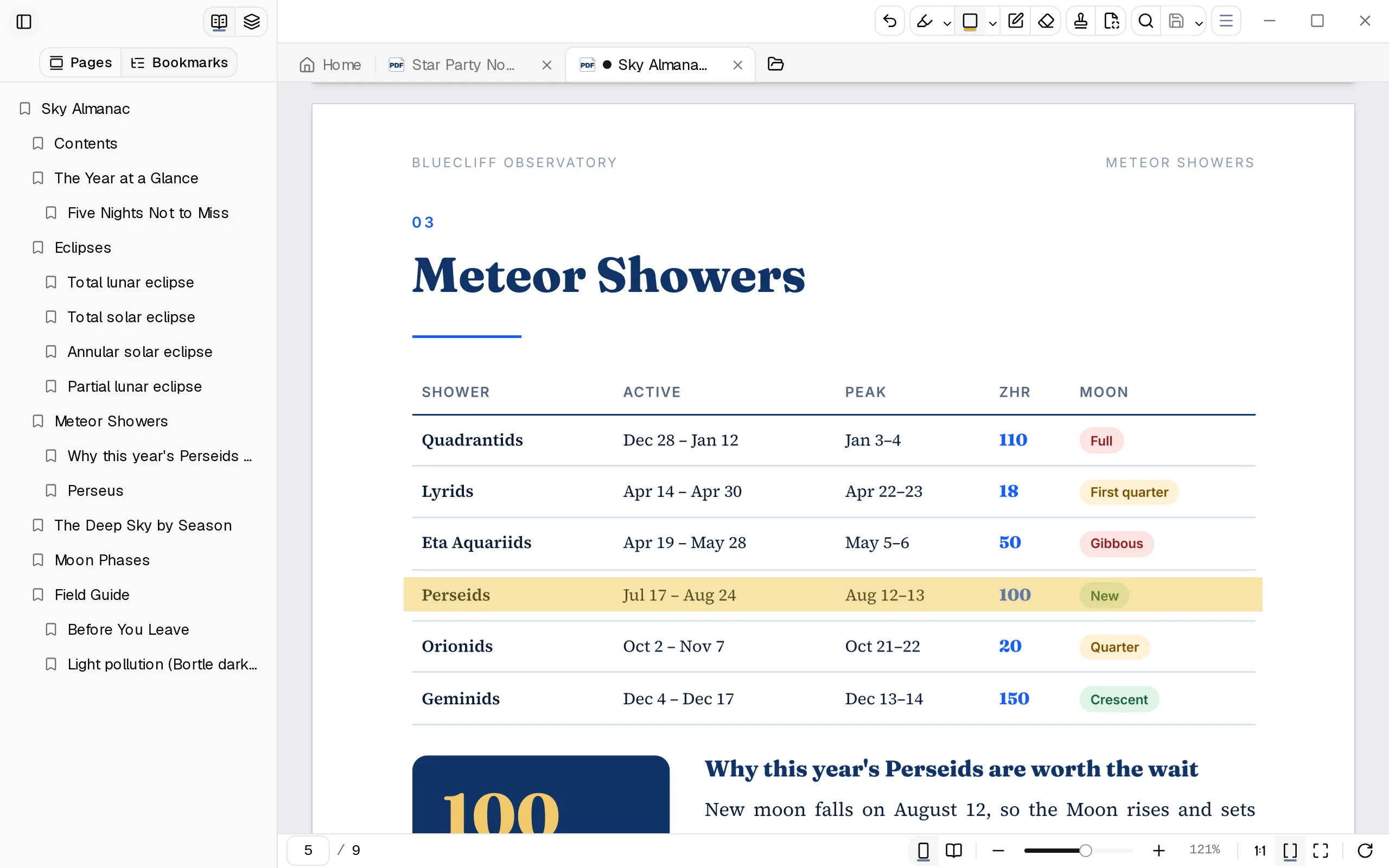
“查看编辑”工作区:侧栏显示书签,流星雨表格中的“英仙座”一行加了半透明方框 The View and edit workspace: bookmarks in the sidebar and a translucent box over the Perseids row

空白页、水印、页码,智能添加Blank pages, watermarks, page numbers, added for you

装订、外发、归档前最费时的三件事,几下点击就能办好,而且打开就有预览。 The three chores that come before printing, sending or filing, each done in a few clicks with a preview first.

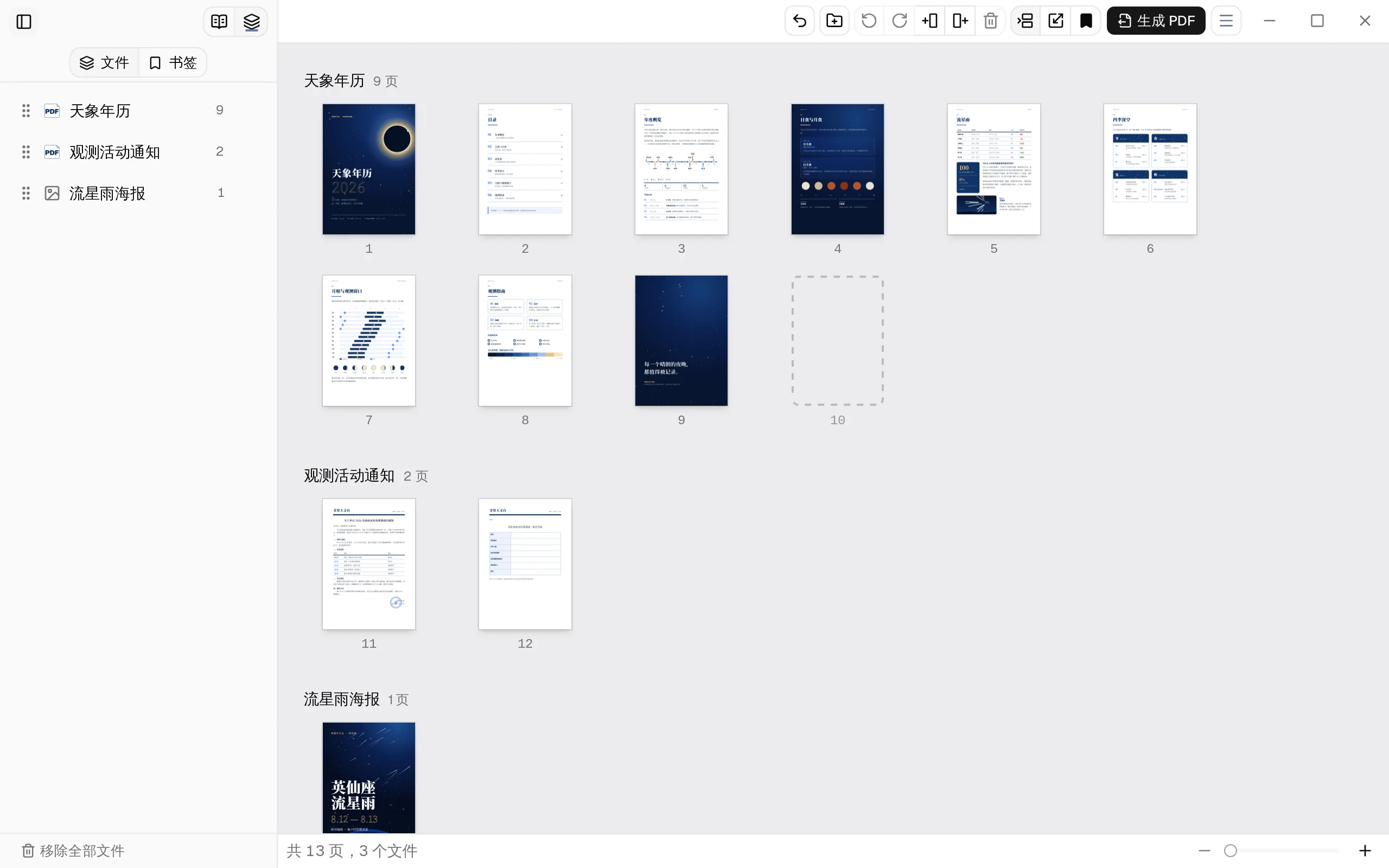
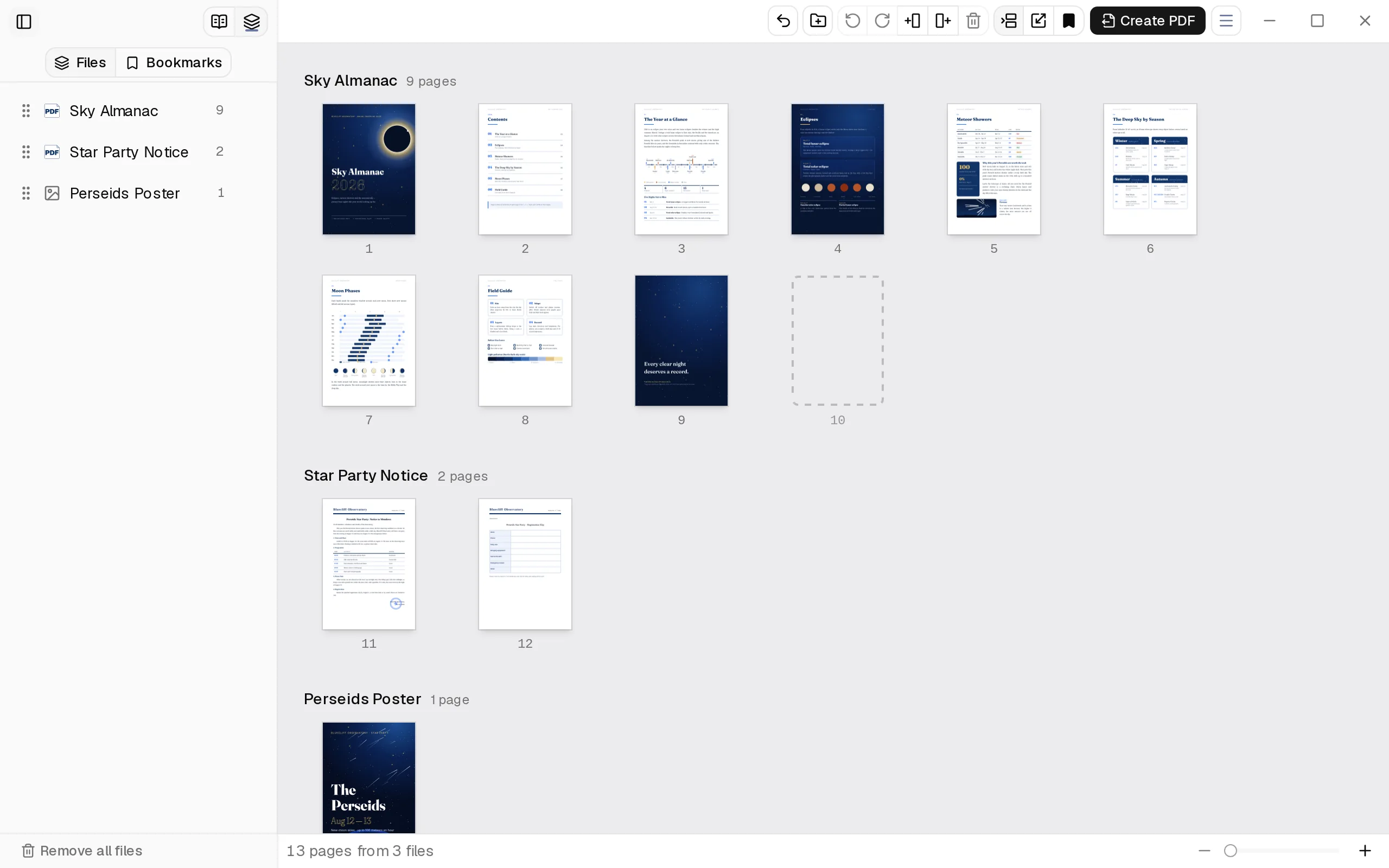
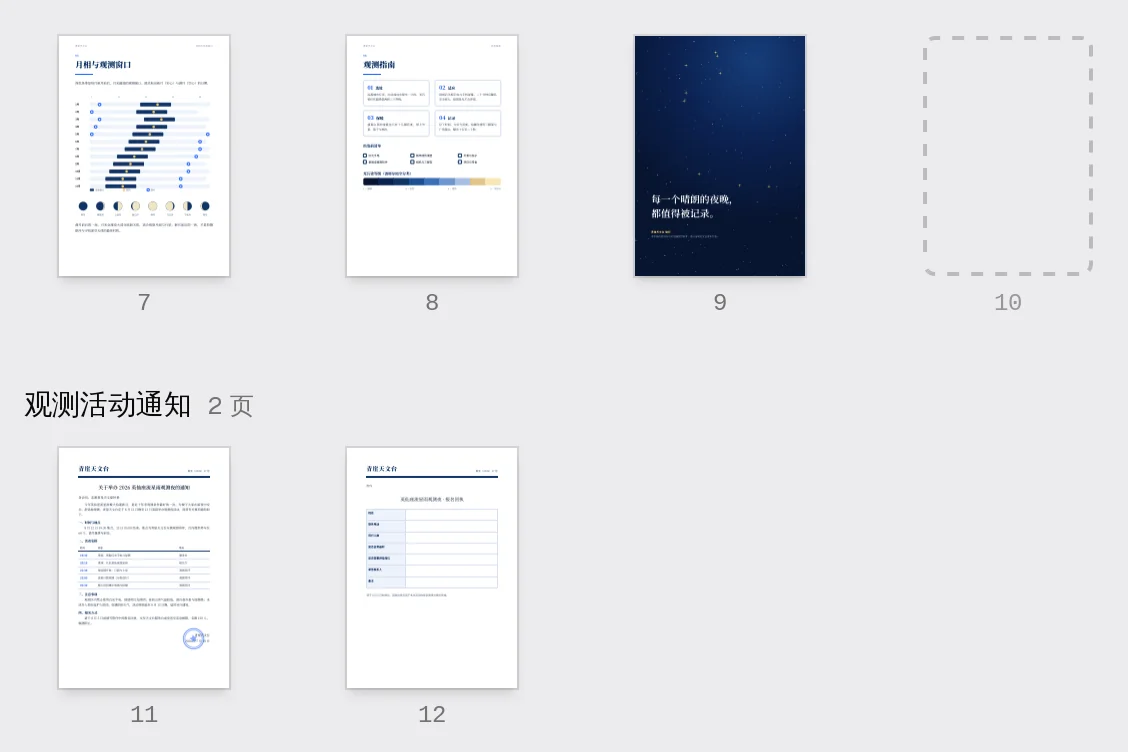
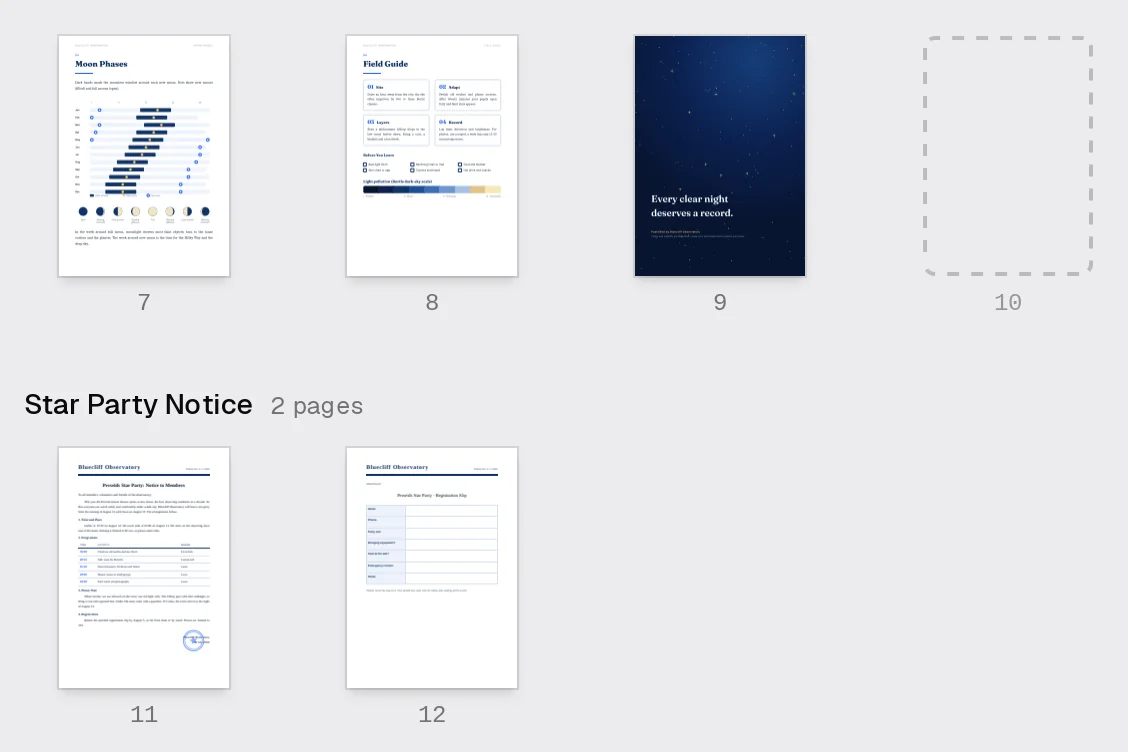
页面组织中,第 10 页是自动补上的空白页,下一个文件从第 11 页开始 In Organize pages, page 10 is an added blank so the next file starts on page 11
虚线框是自动补的空白页,下一个文件从第 11 页开始The dashed page is an added blank; the next file starts on page 11

空白页Blank pages

打开“每个文件都从奇数页开始”,TFolio 只在需要的地方补一张空白页,双面打印时每份材料都从正面起头。也可以在任意两页之间手动插入。 Turn on Start every file on an odd page and TFolio adds a blank only where one is needed, so every file begins on a front side when printed double-sided. You can also insert one between any two pages.

页面组织Organize
自动补页,或在前面、后面插入空白页Automatic padding, or insert before or after
页码Numbers
空白页可以参与计数、隐藏页码或跳过计数Blanks can be counted, counted but unnumbered, or skipped
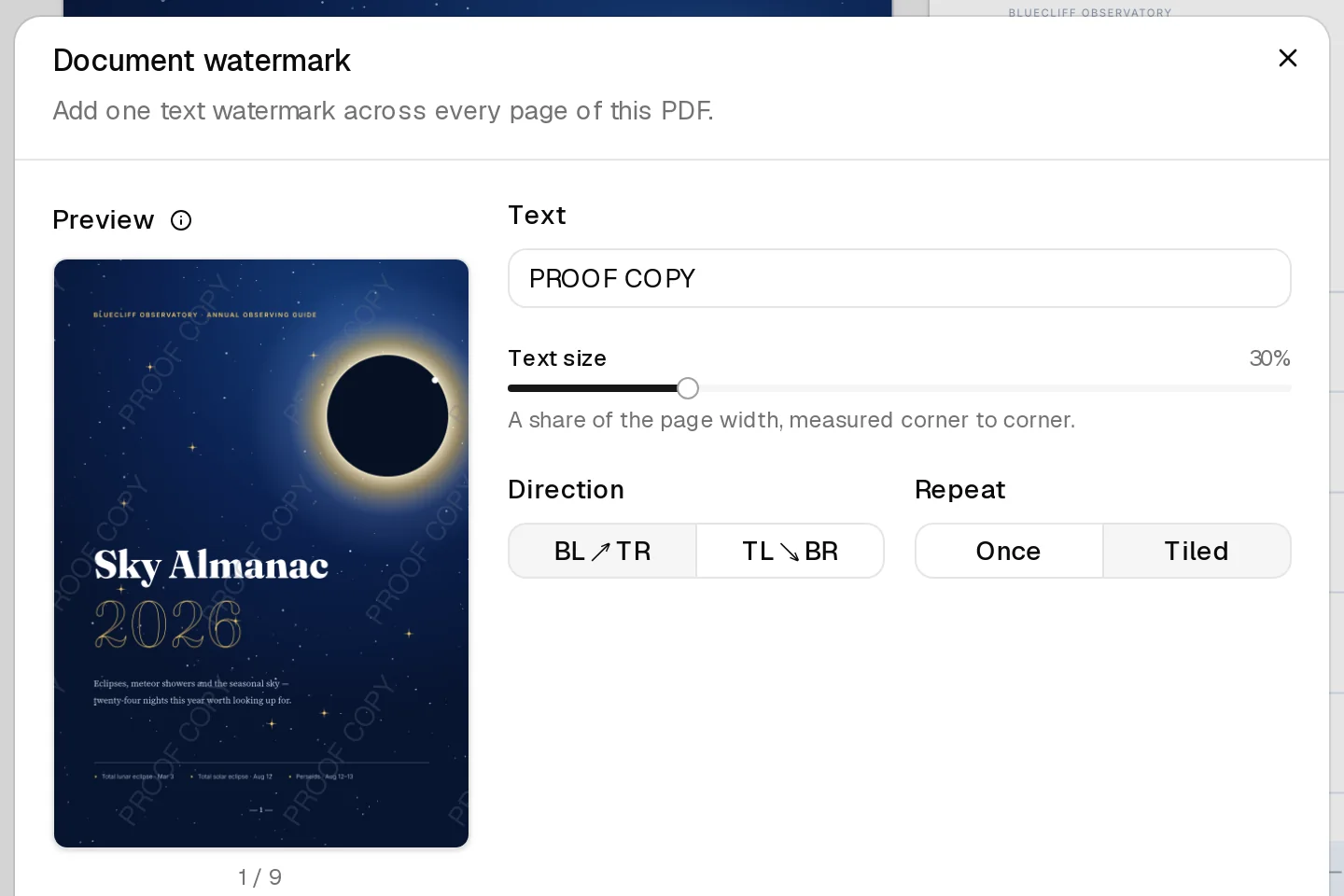
文档水印对话框:斑马式重复的“校对样稿”实时预览 Document watermark dialog with a live preview of a tiled PROOF COPY mark
斑马式重复,预览即成品Tiled, and the preview is the result

水印Watermarks

输入一行字,每一页同时加上同一个水印。文字大小按页面宽度的比例计算,横版、竖版页面都不会走样。 Type one line and every page gets the same mark. Its size is a share of each page’s width, so portrait and landscape pages both look right.

文字方向Direction
左下到右上,或左上到右下Bottom left to top right, or top left to bottom right
重复方式Repeat
仅显示一份,或斑马式重复Once, or tiled
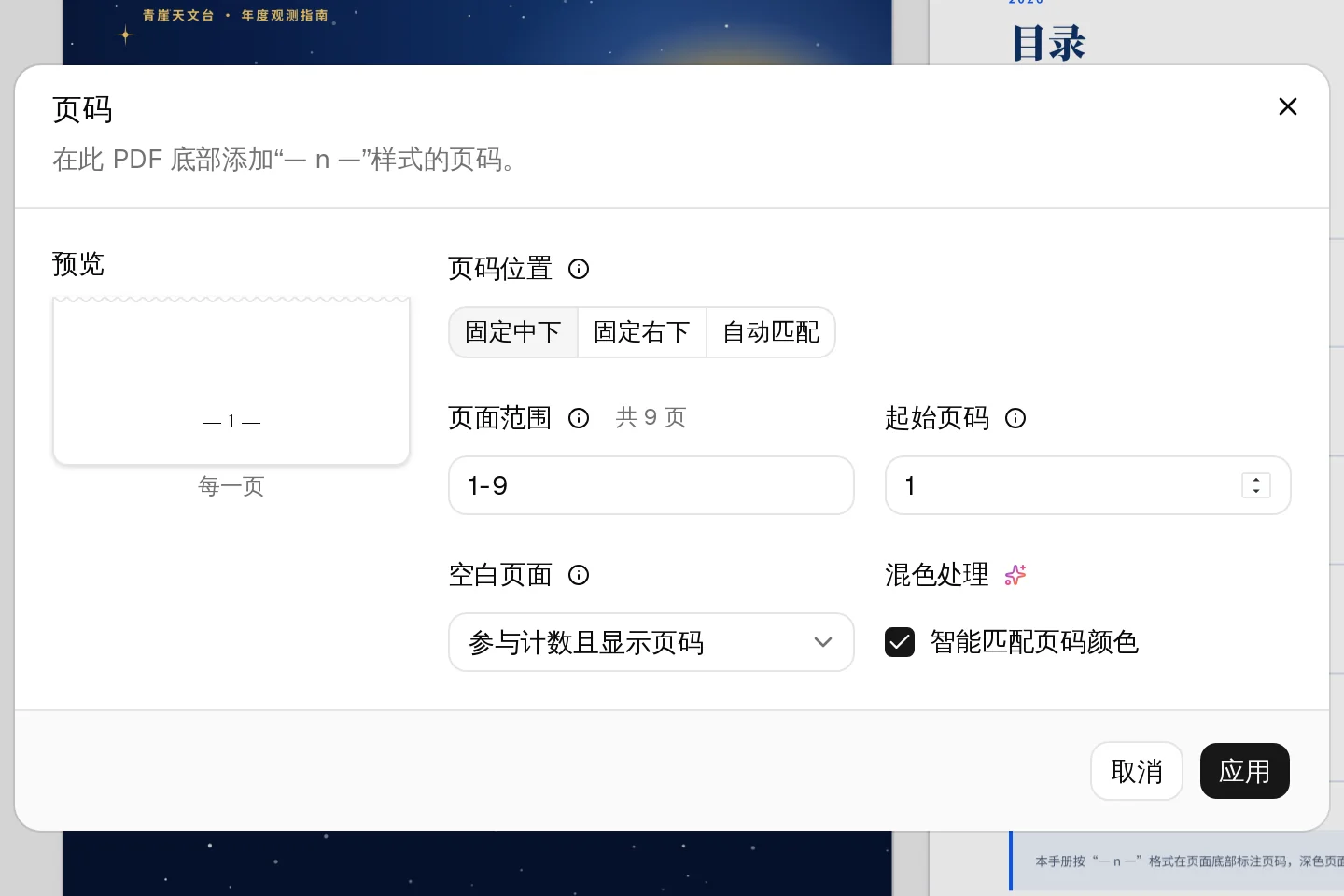
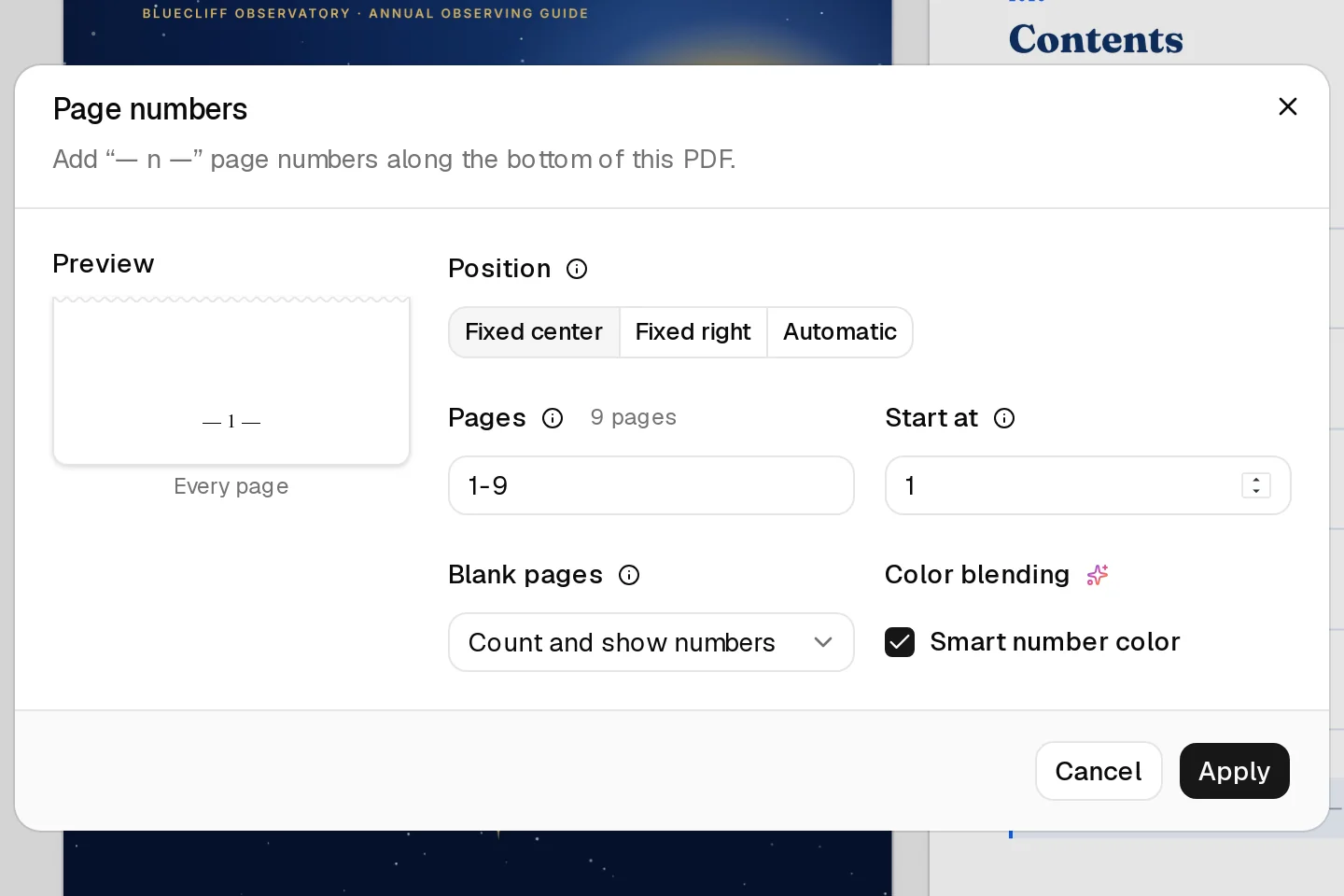
页码对话框:页码位置、页面范围、起始页码、空白页面与智能匹配页码颜色 Page numbers dialog: position, page range, starting number, blank pages and smart number color
“— n —”样式,范围与起始页码可选The “— n —” style, with a range and a starting number

页码Page numbers

在页面底部加上“— n —”样式的页码。选择“自动匹配”,奇数页落在右下、偶数页落在左下,按双面装订镜像对称。 Add page numbers in the “— n —” style along the bottom. Choose Automatic and they mirror for double-sided binding: odd pages bottom right, even pages bottom left.

页码位置Position
固定中下、固定右下或自动匹配Fixed center, fixed right, or automatic
范围Range
任选页面区间与起始页码Any page range, any starting number

细节里见功夫Care in the details

两处小地方,用过就回不去。 Two small things you will miss in any other reader.

换行处的词,也搜得到Search finds words split across lines

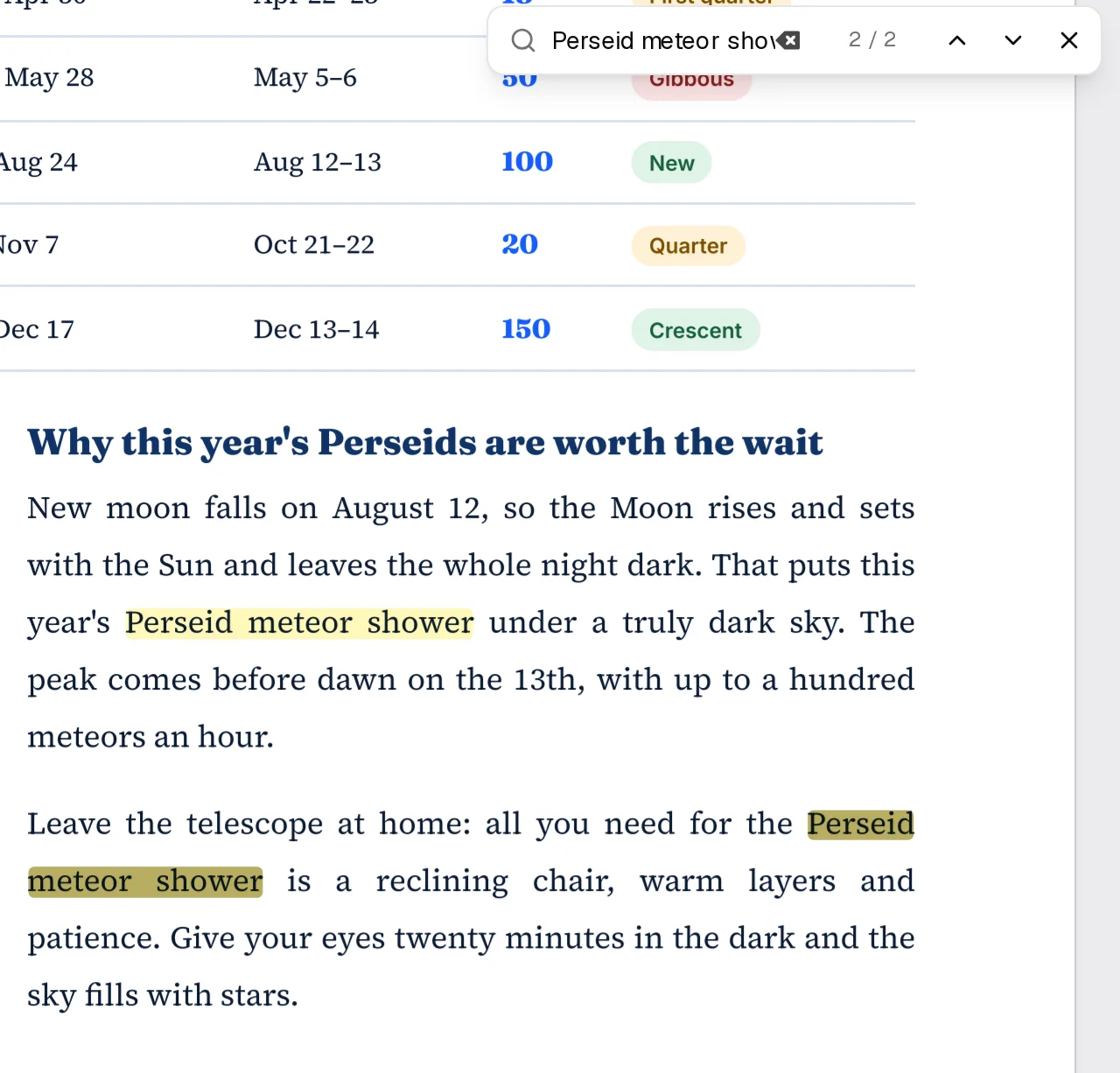
PDF 里一个词常被排版拆在两行,TFolio 照样把它算作一处结果;从别处复制来、带着换行的一句话,直接粘进搜索框也能找到。下面这段文字和右图是同一页,试着改搜别的词。 Typesetting often splits a phrase over two lines; TFolio still counts it as one result, and a sentence pasted with its line breaks is found too. The text below is the page on the right. Try another phrase.

8 月 12 日恰好是新月,月亮与太阳同升同落,整夜没有月光。这意味着今年的英仙座流星雨可以在真正的暗夜里观看,肉眼可见的暗弱流星不会再被月光淹没。极大预计出现在 13 日凌晨,届时英仙座已高悬东北天空,每小时可见数十颗乃至上百颗流星。

观看流星雨不需要任何器材,躺椅、保暖衣物与耐心,静候英仙座流星雨的极大便好。让眼睛在黑暗中适应二十分钟,视野里会多出成倍的星星。

New moon falls on August 12, so the Moon rises and setswith the Sun and leaves the whole night dark. That puts thisyear’s Perseid meteor shower under a truly dark sky. Thepeak comes before dawn on the 13th, with up to a hundredmeteors an hour.

Leave the telescope at home: all you need for the Perseidmeteor shower is a reclining chair, warm layers andpatience. Give your eyes twenty minutes in the dark and thesky fills with stars.

TFolio 搜索“英仙座流星雨”:当前结果跨两行高亮,共 5 处 TFolio searching for “Perseid meteor shower”: the current result is highlighted across two lines

智能匹配页码颜色Smart number color

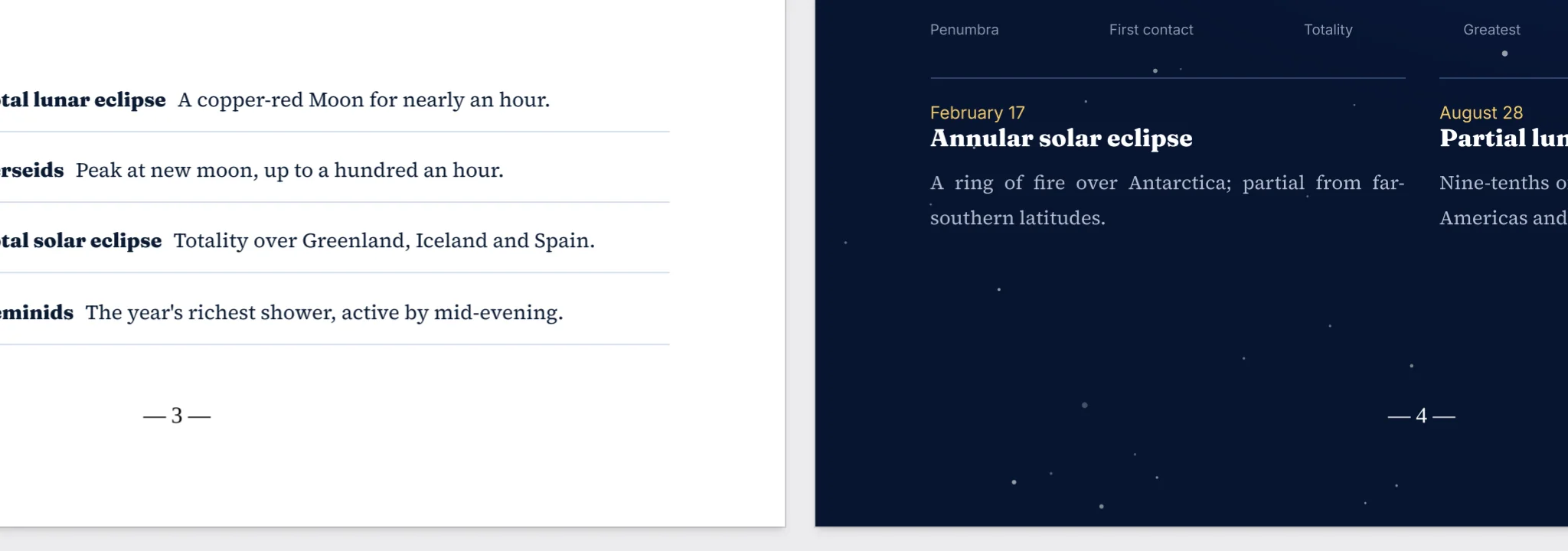
页码默认为黑色,落在深色区域时自动改用白色,深浅页面混排也不用逐页调整。这个页面每一节底部的页码,用的也是同样的配色规则。 Numbers print in black and switch to white where they land on a dark area, so mixed light and dark pages need no fixing by hand. The page numbers closing each section of this page follow the same rule.

书籍视图中的第 3、4 页:浅色页上的“— 3 —”为黑色,深色页上的“— 4 —”为白色 Pages 3 and 4 in book view: “— 3 —” in black on the light page, “— 4 —” in white on the dark page

下载 TFolioDownload TFolio

当前版本 0.1.25。安装后,TFolio 会在启动时检查更新,有新版本会提示你。 Current version 0.1.25. Once installed, TFolio checks for updates when it starts and lets you know when a new version is out.

Windows

Windows 10 与 11,x64Windows 10 and 11, x64

macOS

Apple 芯片与 Intel 处理器Apple silicon and Intel

Linux

x64,三种安装格式x64, in three package formats

所有安装包都来自 GitHub Releases。Every package comes from GitHub Releases. 全部版本与更新日志All releases and changelogs

MIT 开源,
欢迎随时提意见
Open source under MIT.
Ideas always welcome.

TFolio 以 MIT 许可发布,个人和商业用途都免费,源代码全部公开。哪里用着不顺手、想要什么功能,随时在 GitHub 上留言,每一条都会认真看。 TFolio is released under the MIT license: free for personal and commercial use, with all of its source code public. If something feels awkward or a feature is missing, say so on GitHub any time. Every message gets read.